![jira-logo-scaled.png]](https://help.sonovate.com/hs-fs/hubfs/jira-logo-scaled.png?width=103&height=32&name=jira-logo-scaled.png)
Holiday pay
How is holiday pay calculated?
For each of your workers, you need to tell us how much holiday they are entitled to (assuming they were full time). The legal minimum is 28 days (including bank holidays), but you can pay more. This number will then be used to calculate the rate at which holiday pay is accrued on top of the pay rate, e.g. 28 days equates to a holiday pay rate of 12.07%. So for each £100 that a workers earns (gross) they will accrue on £12.07 on top.
NB:
- All rates on an assignment will accrue holiday pay, but expenses won't
- Holiday pay is always calculated on top of the pay rate, so when you're entering the pay rate, ensure that it excludes holiday pay
- This will affect your margin, so please factor this in when negotiating the client charge rate
How is holiday pay paid out?
When you're onboarded, your agency will be set up as either:
- Calculate and retain: holiday pay will be calculated on top of the pay rate, and held in a pot, ready for when your worker wants to claim it. The amount of holiday pay they have accrued will be shown on their payslip.
- Calculate and pay: holiday pay will be calculated on top of the pay rate, and paid out automatically with every payslip. Therefore the worker will not need to claim holiday pay, and will not be paid any extra when they take time off
(This setting can be overridden at worker level, if you have a different arrangement with one of your workers)
NB: in both these scenarios, it is your responsibility as the employer to ensure that workers are taking adequate time off in line with government guidance.
How is holiday pay claimed?
If your worker is "calculate and pay", then they do not claim holiday pay, as it is automatically included on every payslip.
If they are "calculate and retain" then they will need to claim their holiday pay when they want to be paid it. You can do this for them by going to the worker record on the Sonovate portal. Here you will see their holiday balance as a monetary figure. You can then request the amount of holiday pay required. As long as this is done before Wednesday at 12pm it will be included on their next payslip.
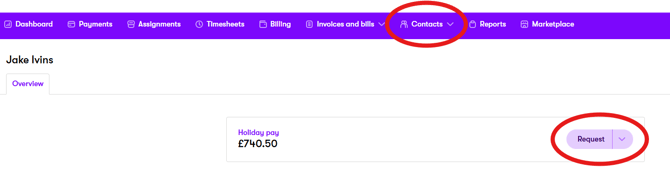
Please note, holiday pay is subject to the same tax and NI deductions as regular pay, so the amount requested may not be the amount received.
What happens with unclaimed holiday pay at the end of the year?
You need to set a leave year, telling us when holiday pay resets.
You also need to tell us what to do with any unclaimed accrued holiday pay at that point. You can do this on the 'Payroll' tab of your settings page. You have two options:
- Pay unclaimed holiday balance to the worker - this will automatically pay out any unclaimed holiday in the first payrun after the reset date
- Reset unclaimed holiday balance - this will remove any unclaimed holiday pay, and reset their allowance to £0 (i.e. they will lose their accrued holiday pay). You must only select this option if this is stated in your employment contract with the worker.
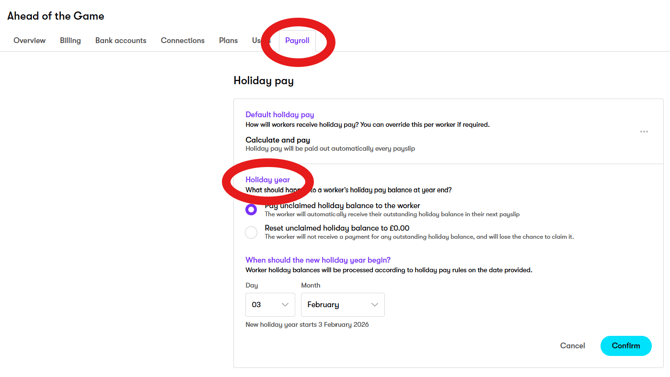
If you don't select either option, then the holiday balance will roll over to the next leave year.
NB - Whilst these settings are not relevant if your workers have holiday pay paid out on every payslip, we still require them to be set, in case any of your workers ever get set to retain holiday pay.
Other statutory payments
Other statutory payments (such as sick pay and parental leave) should be requested by raising a ticket on the platform no later than Tuesday at 12pm. The payment will then be included on the worker's next payslip.