![jira-logo-scaled.png]](https://help.sonovate.com/hs-fs/hubfs/jira-logo-scaled.png?width=103&height=32&name=jira-logo-scaled.png)
Introduction
With Sonovate's flexible payroll solution, you can decide exactly when to run payroll for your PAYE workers.
Your options for when you run payroll
If you are running weekly payroll through Sonovate, you have two options:
- The traditional schedule of:
- Payroll on Wednesday
- Get your workers paid by Thursday
- A new, flexible way to run Payroll any day:
- Run payroll on any day you want, as often as you need
- Get your workers paid the next day
If you are running monthly payroll through Sonovate, you have two options:
- The traditional schedule of:
- Payroll on the first Wednesday of the month
- Get your workers paid on the Thursday
- A new, flexible monthly schedule:
- Payroll on the first Wednesday of the month
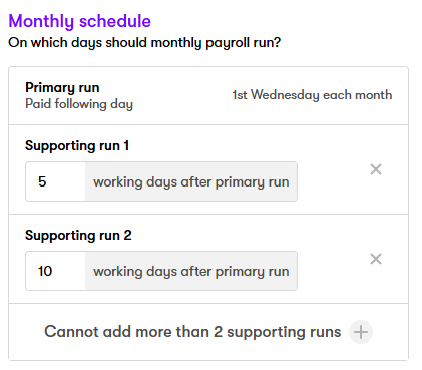
- Run up to two additional payruns later in the month to sweep up late timesheets
Summary of your options:
| Traditional payroll | Flexible payroll schedules | |
| Weekly payroll |
- Payroll runs every Wednesday - Workers are paid on Thursday - Late timesheets wait until the following week |
- Payroll runs on as many days as you want - Workers are paid the following day - Late timesheets are automatically swept up in the next available payrun |
| Monthly payroll |
- Payroll runs on the first Wednesday of the month - Workers are paid on Thursday - Late timesheets wait until the following month |
- Payroll runs on the first Wednesday of the month - You can set up to two additional payruns per month - Workers are paid the day after payroll - Late timesheets are automatically swept up in the next available payrun |
How to set up flexible payroll schedules
Sonovate's new flexible payroll schedules give you complete control over when to run your payroll.
You can speak to us about turning this feature on.
Once the feature is enabled, you can configure your payroll schedule on your customer settings page
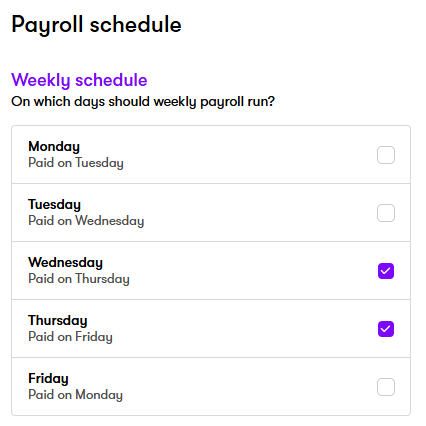
If you run weekly payroll, select the days of the week that you would like to run payroll:
If you run monthly payroll, set up to two additional days to run sweep-up payruns:
This allows you to say goodbye to the headache and inefficiency of late timesheets and advances.
An example
Let's say you configure your weekly payroll schedule to run on Wednesday and Thursday:
- Most of your workers get their timesheets in and approved by Wednesday morning. They will all be swept up in your main run on Wednesday, and paid on Thursday
- Then one of your workers misses the deadline, but manages to get their timesheet approved by close of play Wednesday - that timesheet would get swept up in your Thursday payrun and paid on Friday
- This will all happen without any manual requests or intervention from you, as long as your payroll schedule is set to run on those days
FAQs
- How many days a week can I run payroll? If you run weekly payroll, as often as you like. You could set it to run every day, or just have one main run and one "sweep-up" run, for example. For monthly payroll, you can have two extra payruns a month (in addition to your main run on the first Wednesday of the month). Payroll will only be run if there are timesheets to be processed.
- Does it cost extra to have this new flexibility? A small supplementary charge will apply. Speak to the team about it today.
- If I don't take this flexibility, can I still process a late timesheet? You can, but there may be a one-off charge for doing so.